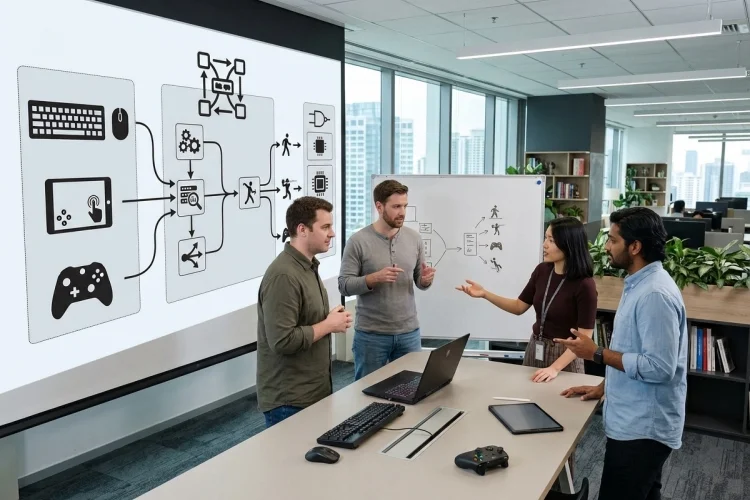
Modern entertainment platforms rarely live on a single type of hardware anymore. A user might start a game on a desktop with a keyboard, continue on a tablet using touch controls, then switch to a smart TV with a wireless controller.
Behind that seemingly simple experience is a surprisingly complicated input system. Advanced Input Architecture is what keeps those interactions predictable.
Rather than letting every device communicate directly with application logic, a well-designed architecture creates layers that translate different hardware signals into consistent actions the platform can understand.
Why Multi-Device Input Becomes Complicated Fast
Supporting one keyboard is easy. Supporting keyboards, mice, touchscreens, gamepads, remotes, styluses, accessibility devices, motion sensors, and platform-specific controllers is a different problem entirely.
Each device can produce information in its own format. A keyboard sends key states, a gamepad provides buttons and analog axes, while touch interaction may involve multiple pointers moving at the same time.
W3C Pointer Events, for example, provide a hardware-agnostic model covering mouse, pen, and touchscreen interaction.
The mistake is handling every device seperately throughout the application. That approach creates large amounts of conditional logic and becomes increasingly difficult to maintain.
A stronger architecture converts hardware-specific events into a smaller collection of meaningful input states.
Build a Device Abstraction Layer First
The first layer should communicate directly with hardware or operating-system APIs. Its job is simple: collect input without deciding what that input actually means inside the application.
Imagine three users triggering the same action.
One presses the Enter key. Another presses the A button on a controller. A third taps a button on a touchscreen.
At the hardware level, those interactions are completely different. At the application level, they might all mean:
Confirm
This separation is one of the most important ideas behind Advanced Input Architecture.
Microsoft’s GameInput follows a comparable philosophy by providing a unified interface for keyboards, mice, gamepads, and other controllers while supporting both polling and event-driven input.
The application therefore doesn’t need to care whether Confirm came from a keyboard, gamepad, or remote.
Normalize Raw Input Into a Common Format
Once input enters the system, it should be normalized.
Gamepads are a great example. Different controllers may expose different button layouts, axis values, capabilities, or device identifiers.
SDL solves part of this problem through its gamepad layer, which maps low-level joystick inputs into standardized locations such as triggers, sticks, shoulder buttons, and directional controls.
A platform can adopt the same strategy internally.
Instead of:
ControllerButton7
the application receives:
PrimaryAction
Instead of:
Axis2 = -0.76
it might receive:
MoveHorizontal = -0.76
This normalized representation creates a more consistant foundation for gameplay, menus, streaming interfaces, media browsers, and interactive entertainment applications.
Separate Physical Inputs From Logical Actions
A scalable input system should distinguish between controls and actions.
Controls describe physical events:
Keyboard Space
Gamepad Button A
Touchscreen Tap
Remote Select
Actions describe user intent:
Jump
Confirm
Play
Pause
This distinction makes remapping dramatically easier.
Suppose a user prefers the right bumper instead of the A button for an action. With action mapping, only the configuration changes. The gameplay system still receives the same logical command.
This approach is also useful for accessibility because users can adapt control schemes without requiring developers to rewrite application behavior.
It improves compatiblity across devices while reducing duplicated code.
Add Context-Aware Input Routing
The same physical input does not always mean the same thing.
Pressing Escape while playing could open a pause menu. Pressing Escape inside that menu might close it. Moving an analog stick during gameplay could control a character, while moving the same stick in a media application could navigate between content cards.
That means input requires context.
A practical routing hierarchy could look like:
Device Input → Normalization → User Mapping → Active Context → Application Action
Only the currently active context should consume relevant commands.
For example, if a settings dialog is open, navigation input should go to the dialog rather than the scene running underneath it. This prevents the classic problem where a player changes a setting and accidentally moves their character at the same time.
Context stacks are particularly useful because overlays, menus, chat windows, gameplay, and accessibility interfaces can temporarily gain or release input priority.
Decide Between Events and Polling Carefully
Not every input source should be processed the same way.
Event-driven input works well for discrete interactions such as keyboard presses, taps, connection changes, or UI navigation. Continuous controls such as analog sticks are often better handled through polling.
The browser Gamepad API, for example, lets applications inspect connected controller state through navigator.getGamepads(), while connection and disconnection can be detected through events.
Microsoft also notes that polling controller state can fit naturally with deterministic game loops because the application receives a snapshot of input at a specific moment.
A hybrid system is usually the practical answer.
Use events where changes matter immediately and polling where continuous state matters more than individual event occurance.
Treat Input Latency as Part of Architecture
An input system can be beautifully organized and still feel terrible if it introduces delay.
Every additional stage—device driver, input queue, normalization, mapping, simulation, rendering, and display-can contribute to perceived latency.
For high-interaction entertainment applications, input should usually be captured close to the simulation update. Avoid unnecessary queues between the hardware adapter and action layer.
Timestamping input events is also useful. It lets developers understand when an interaction actually happened instead of assuming the processing time represents the input time.
Microsoft specifically emphasizes low latency and performance as design goals of GameInput, including thread-safe and largely lock-free operations suitable for time-sensitive application paths.
The goal isn’t simply receiving input quickly. It is keeping the entire path from physical interaction to visible response predictable.
Design for Devices You Haven’t Seen Yet
The biggest advantage of Advanced Input Architecture is not support for today’s hardware. It is flexibility when tomorrow’s hardware arrives.
If application logic depends on abstract actions rather than specific devices, adding a new controller becomes much simpler.
A motion controller might produce Navigate, Select, and Back. A future wearable could generate exactly the same logical actions. The entertainment application itself may require almost no modification.
That architecture also makes automated testing easier because virtual input sources can generate actions without requiring physical hardware.
A reliable multi-device platform starts by separating hardware signals from user intent. Normalize device input, map it into logical actions, route commands through active contexts, and keep latency visible throughout the pipeline.
Build your Advanced Input Architecture around abstraction today, and adding tomorrow’s controllers, screens, and interaction methods becomes far less painful.